Classes and Objects - Revision
class - model, Type. It has methods (functions)
and data:
public class Student {
String
name; //data
int
markJava; //data
void
changeMarkJava(int mark){ // method
markJava += mark;
}
Student(String name){ // constructor
this.name=name;
markJava=2;
}
Student(String name,int mark){ // constructor
this.name = name;
markJava = mark;
}
} |
Object -
variable, instance
of a class
create :
Student s1 = new Student("...");
acess data: s1.mark
Initialization of objects
Non-initialized variables are one of the main causes of "bugs" in a
program. Java (as well as C ++) introduces a special method called
"constructor", which is started each time an object is created. This
method:
- Aims to initialize member data;
- His name is identical to the name of the class
- There is no type, ie. no result calculated after
execution (even "void") .;
- There is a default constructor.
The initialization of each object goes through four stages:
1) Reserve the required memory in the "heap" for
member data;
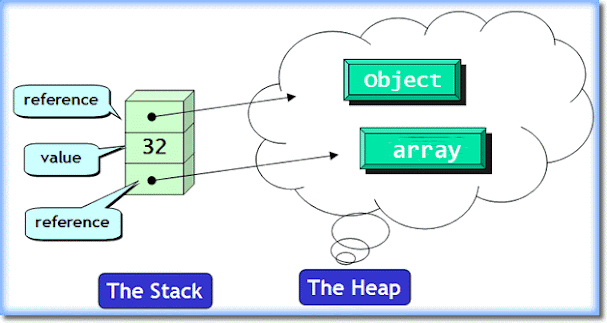 (the
image is taken from here)
(the
image is taken from here)
2) All member variables are initialized with a value
of 0;
3) The values declared (if any) in the class
declaration are used to change the variables' values;
4) The constructor is started, if one is created to
complete the class initialization.
public class Test {
public
static void main (String [] args){
Student s1,s2;
// 2 object references in the stack
s1 = new Student ("Ahmed"); //creates an
object in the heap
s2 = new Student ("Mehmed",3); //creates an
object in the heap
System.out.println(s1.name); //
access to data
System.out.println(s1.markJava);
// access to data
System.out.println(s2.name); //
access to data
System.out.println(s2.markJava);
// access to data
}
} |
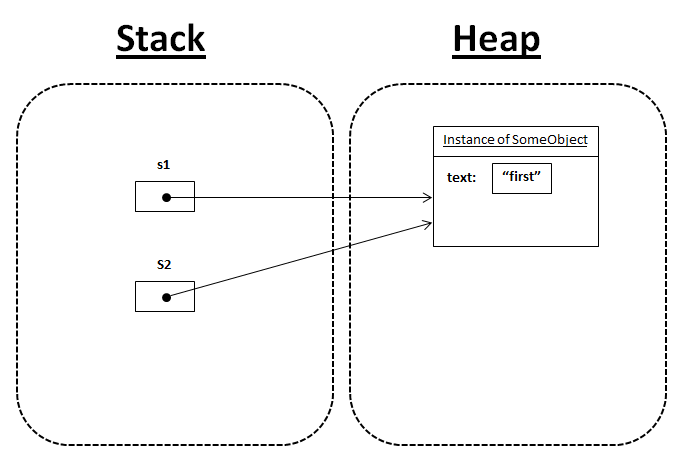
Assigning between two objects results in two references pointing to the
same object:
|
class
Ex1 {
String text;
Ex1(String par){
this.text=par;
}
}
public
class Assignment {
public static void
main(String[] args) {
Ex1 s1 = new Ex1("first");
Ex1
s2 = new Ex1("second");
System.out.println("1: s1 " + s1.text +", s2: " + s2.text);
s2 = s1;
System.out.println("1: s1 " + s1.text +", s2: " + s2.text);
s1.text = "third";
System.out.println("1:
s1 " + s1.text +", s2: " + s2.text);
}
}
|
 |
Relational operators '= =' and '! =' do not refer to objects, but to
their references:
|
class
Number {
int i;
Number(int par){
i=par;
}
}
public
class Equivalence {
public static void main(String[] args) {
Number n1 = new Number(47);
Number n2 = new Number(47);
System.out.println(n1 == n2); //compares
the references
- false
System.out.println(n1 != n2); //compares
the references -
true
}
}
|
The equals () method is used to compare the objects themselves (for new
classes it must be redefined, otherwise it compares aliases again)!
class Number {
int i;
Number(int par){
i=par;
}
boolean equals(Number n) {
if
(this.i == n.i)return true;
else
return false;
}
}
public
class Equivalence {
public static void main(String[] args) {
Number n1 = new Number(47);
Number n2 = new Number(47);
System.out.println(n1 == n2); //compares the references - false
System.out.println(n1 != n2); //compares
the references -
true
System.out.println(n1.equals(n2)); //compares the objects - true
}
}
|
Static (class) members
The
static keyword means that a member – like a field or method
– belongs to the class itself, rather than to any specific
instance of that class. As a result,
we can access static members without the need to create an instance of
an object.
When declaring a static member component, memory is allocated for it
once, regardless of the number of created objects.
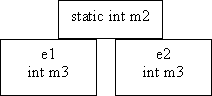
All objects in the class use the same static member. Static functions
do not receive 'this' as a
parameter, so they do not have direct access to non-static class
components. In this case, object aliases must be used to access these
components.
class
Exemple {
int m3=1;
static int m2=3;
void fn() {
//non static function, need object
...
}
static void func() {
Example e1 = new Example();
Example e2 = new Example();
int k = m2; // direct access
int n = e1.m3; // access via the reference
e2.fn();
// call the function via the reference (hiden argument this)
…
}
public static void main (String[] arg){
func();
direct call
...
}
…
}
Wrapper classes
Each primitive type corresponds to a "wrapper class", which allows the
creation of objects corresponding to the primitive type. All wrapper
classes have a constructor receiving an argument of a primitive type:
char c = 'e';
Character cObj =
Character.valueOf('d'),cObj1=Character.valueOf(c);
boolean b = false;
Boolean bObj =
Boolean.valueOf(true),bObj1=Boolean.valueOf(b);
Float fObj = Float.valueOf(4.3f);
int m=4, n=7;
Double dObj =
Double.valueOf(15.4);
Integer iObj =
Integer.valueOf(m+n);
The wrapper classes are immutable, meaning that the created objects
won't alter the value. Each time an object is modified, Java recreates
another object with the new value.
Boxing and unboxing. It is
possible to make implicit conversions between wrapper class objects and
corresponding primitive type variables. As a result, it is possible to
mix in an expression wrapper objects and primitive variables.
public class Test {
public static void main(String[] args) {
Character
c = 'a'; //boxing
Double
dObj = 15.4+7; //boxing
char ch =
c; //unboxing
double d
= dObj; //unboxing
System.out.println(dObj-5.4); //unboxing dObj
System.out.println(c); //unboxing
System.out.println(d);
}
} |
There are two classes for high-precision arithmetic – BigInteger и BigDecimal.
|
type primitive
|
wrapper class
|
|
boolean
|
Boolean
|
|
char
|
Character
|
|
byte
|
Byte
|
|
short
|
Short
|
|
int
|
Integer
|
|
long
|
Long
|
|
float
|
Float
|
|
double
|
Double
|
|
void
|
Void
|
|
-
|
BigInteger
|
|
-
|
BigDecimal
|
Three reasons to use wrapper class instead of primitive type:
• For storage in lists which is only for objects.
• To use a constant defined in the class for corresponding
primitive type. For example MIN_VALUE or MAX_VALUE.
• To use the methods for type conversion, conversion from strings,
and for conversion between systems (decimal, octal, hexadecimal,
binary).
public class WrapClass {
public static void
main(String args[]) {
System.out.print ("The digits in hexadecimal: ");
for(int j=0;j<16;++j)
System.out.print(Character.forDigit(j,16)+" ");
System.out.println();
int m =
Integer.parseInt("254"); //254 radix 10
int i =
Integer.parseInt("ef",16); //6+14*16 = 230
long ln =
Long.parseLong("abcd",16); //13+12*16+11*256+10*4096
System.out.println(ln + "
radix = 10: "+ln);
System.out.println(ln+"
radix=2: "+Long.toString(ln,2));
System.out.println(ln+"
radix=16: "+Long.toString(ln,16));
System.out.println("float
min value: "+Float.MIN_VALUE);
System.out.println("double
max value: "+Double.MAX_VALUE);
}
}
Remarks:
The Java Character forDigit() determines the character representation
for a specific digit in the specified radix. A radix is defined as the
number of unique digits, including zero, present in a numeric system
Modifiers final, synchronized and
native
final: specifies that the
member variable has a constant value (initialized before first use).
The member method cannot be redefined in a derived class.
In other words, the final indicates that the component is defined in
its final version.
synchronized: specifies that
the method is "mono-thread". The synchronized method allows a single
thread at a time.
native: specifies that the
method is implemented in en C and is in an executable file. The method
has only a declaration, not a definition:
native int Cprogramme
();
