Network programming in Java
Internet protocol
suite TCP/IP
Package java.net
Identifying a machine
The InetAddress class
The URL class
Servers and clients
Internet
protocol suite TCP/IP
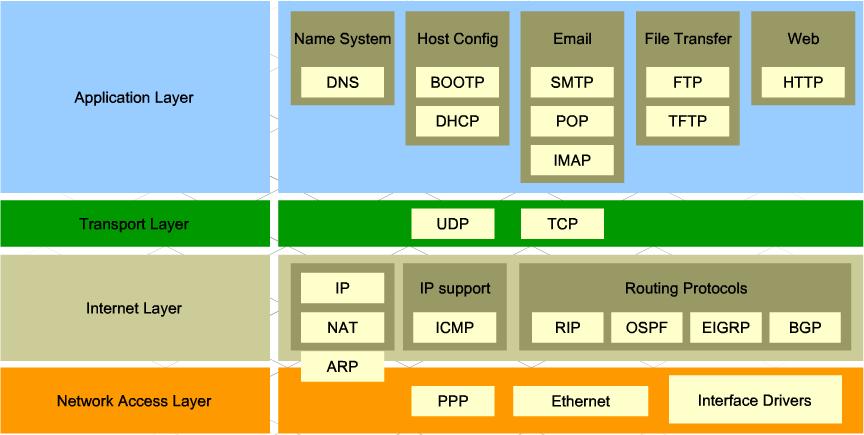
Des exemples de protocoles des
couches de transport et d'application (Image copiée de ce
site )
IP (Internet protocol) - packet switching. No standard Java API allowing direct IP
protocol manipulation
UDP (User Datagram Protocol) - fast, unreliable,
unconnected message delivery.
TCP (Transmission Control Protocol) - streaming
transmission, reliable, slower, in connected mode
This package provides a set of classes to
communicate on the Internet (and Intranet), download URLs, define new
protocols.
In particular, it allows you to create and access
* URL connections.
* Stream socket (TCP) connections.
* Datagram socket (UDP) connections.
| Interfaces |
Classes |
Exceptions |
ContentHandlerFactory
FileNameMap
SocketImplFactory
SocketOptions
URLStreamHandlerFactory |
Authenticator
ContentHandler
DatagramPacket
DatagramSocket
MulticastSocket
DatagramSocketImpl
InetAddress
NetPermission
PasswordAuthentication
ServerSocket
Socket
SocketImpl
SocketPermission
URL
URLClassLoader
URLConnection
HttpURLConnection
JarURLConnection
URLDecoder
URLEncoder
URLStreamHandler |
MalformedURLException
ProtocolException
SocketException
BindException
ConnectException
NoRouteToHostException
UnknownHostException
UnknownServiceException |
Address IP - DNS form - ff.tu-sofia.bg
“dotted quad” form - 194.141.64.254
32 bits in IPv4:
0xxx: this is a class A address
10xx: this is a class B address
110xx: this is a class C address
128 bits in IPv6
Does not have public variables and constructors
Some functions:
static InetAddress getByName(String host) - The address
IP on one machine (host).
static InetAddress[] getAllByName(String host) -
all IP addresses on one machine
public static InetAddress getByAddress(byte[] addr) - IPv4 must
be 4 bytes, IPv6 - 16.
static InetAddress getLocalHost() -the address of the local
machine.
getByName(null) ~ getByName("localhost") ~ getByName("127.0.0.1")
String getHostAddress() - IP address as a string
"%d.%d.%d.%d".
String getHostName() - machine name at this address.
boolean isMulticastAddress() - checks if it is a
multicast IP address.
import
java.net.*;
public class NSLookupApp {
public static void main(String
args[]) {
try {
if(args.length!=1){
System.out.println(""Requires hostName as parameter"");
return;
}
InetAddress host = InetAddress.getByName(args[0]);
String hostName = host.getHostName();
System.out.println("Host name: "+hostName);
System.out.println("IP address: "+host.getHostAddress());
}
catch(UnknownHostException
ex) {
System.out.println("Unknown host");
return;
}
}
} |
Exercise: Show all IP addresses of yahoo.com
URL: Uniforme Resource Locator.
A character string that allows unique location of a resource on
the Internet network - the protocol to use, the host machine (IP
address + port number), the access path (path), name of the resource
(file ):
protocol: //machine[:port]/path/name
https://ff.tu-sofia.bg/JavaTech/network/Reseau.html
Description
Contains methods for creating and opening web pages. Does not have
variables.
Constructors
We can build an object
* from protocol, host and path
* from a character string (URL address)
* or from another URL object:
URL u1 = new URL("https",
"ff.tu-sofia.bg", "/futurs-etudiants/");
URL u2 = new URL("https://ff.tu-sofia.bg/");
URL u3 = new URL(u2, "Java/Network.htm"); //
https://ff.tu-sofia.bg/Java/Network.html
All constructors can throw MalformedURLException.
The different types of URL objects are used with
different protocols, most commonly with http, https and ftp. The URLs
for these protocols are used to locate various files, such as web
pages, images, multimedia files, text files and downloadable programs.
They can be used for executable programs as well, such as CGI scripts.
Example
import
java.net.MalformedURLException;
import java.net.URL;
public class Test
{
public static void main(String[] args)
throws MalformedURLException {
// creates a URL with string
representation.
URL url1 =
new URL("https://ff.tu-sofia.bg"+
"/sites/default/files/documents_ff/FICHE_INSCRIPION-IC_002.pdf");
// creates a URL with a
protocol,host name,and path
URL url2 = new URL("https",
"ff.tu-sofia.bg",
"/futurs-etudiants/");
//create a URL with another URL
and path
URL url3 = new
URL("https://ff.tu-sofia.bg");
URL url4 = new URL(url3,
"/futurs-etudiants/");
// print the String
representation of the URL.
System.out.println(url1.toString());
System.out.println(url2.toString());
System.out.println();
System.out.println("Different
components of the URL");
// Retrieve the protocol for the
URL
System.out.println("Protocol
url1: " + url1.getProtocol());
// Retrieve the host name of the
URL
System.out.println("Hostname
url1: " + url1.getHost());
// Retrieve the default port
System.out.println("Default port
url1: " + url1.getDefaultPort());
// Retrieve the path of URL
System.out.println("Path url4: "
+ url4.getPath());
// Retrieve the file name
System.out.println("File url1: "
+ url1.getFile());
}
}
|
The I/O classes can be linked to an
URL
Example: copy a
binary file from a URL
import java.io.*;
import java.net.*;
public class Test1 {
	  public static void main(String arg[]) {
	      int abyte;
	      try{
	        URL url = new URL("https://ff.tu-sofia.bg/sites/default/files/images/blogs/FF_Poster.jpg");
	        InputStream fi= url.openStream();
	        FileOutputStream fo= new FileOutputStream("picture.jpg");
	        System.out.println("srarting ...");
	        while((abyte= fi.read())!=-1)fo.write(abyte);
	        fi.close();
	        fo.close();
	        System.out.println("created");

	     }catch(MalformedURLException me) {
	         System.out.println("MalformedURLException: "+ me);
	     }catch (IOException ioe){
	          System.out.println("IOException: "+ ioe);
	     }

	}
}
|
With a buffer:
import java.io.*;
import java.net.*;
public class Test2 {
	  public static void main(String arg[]) throws MalformedURLException, IOException{
	      byte buf[]=new byte[1024];
	      int len;

	        URL url = new URL("https://ff.tu-sofia.bg/sites/default/files/images/blogs/FF_Poster.jpg");
	        InputStream fi= url.openStream();
	        FileOutputStream fo= new FileOutputStream("picture1.jpg");
	        System.out.println("srarting ...");
	        while((len= fi.read(buf))!=-1)fo.write(buf,0,len);
	        fi.close();
	        fo.close();
	        System.out.println("created");
	}
}
|
Example - displaying source
code of a URL page
import
java.io.*;
import java.net.*;
class ReadURL{
public static void main(String[] a){
try{
URL url = new
URL("https://ff.tu-sofia.bg");
BufferedReader br =
new BufferedReader(new
InputStreamReader(url.openStream()));
String line;
while((line=br.readLine()) !=null) {
System.out.println(line);
}
br.close();
}catch(MalformedURLException me) {
System.out.println("MalformedURLException: "+ me);
}catch (IOException ioe){
System.out.println("IOException: "+ ioe);
}
}
} |
-
-
server - listens to the network and waits for someone to
connect. Concept linked rather to the application, not to the machine.
client - calls the server to establish a connection.
Sockets and ports
port - integer of type "int", software abstraction, second level
of addressing in a machine to identify the corresponding server
application and the service provided. Ports 1 - 1024 are reserved for
standardized services.
Each application - server is linked to the concrete port.
ServerSocket - binds the server application to the
corresponding port, listens on the network
Socket - software abstraction to represent the two "terminals" of
the connection between the two machines. Used by the client application
to connect and "chat". Used by the server application to "chat" once
the connection is established.
server procedures
* creating a ServerSocket - to reserve a port
and listen to the network;
* starting new TCP connection - creation of
a Socket after receiving a call (creating socket) from a
client;
* creation of an InputStream and OutputStream (or,
with corresponding converters, Reader and
Writer);
* perform reading of InputStream(Reader) and
writing to OutputStream(Writer).
* finishing the TCP connection - closing the
created Socket after receiving a request (closing the socket) from the
client.
client procedures :
* creation of an InetAddress (the server machine
must be on the network)
* creation of a Socket (call to the server,
the server application
must be linked to the port)
* creation of an InputStream and OutputStream
(or, with corresponding converters, Reader and Writer);
* perform reading of InputStream(Reader) and
writing to OutputStream(Writer);
* closing the created Socket (request to
server to close the connection).
A communication
protocol needs to be specified in advance
Example: A simple server and client
// FirstServer.java
// Very simple server that just
// echoes whatever the client sends.
import java.io.*;
import java.net.*;
public class FirstServer {
// Choose a port outside of the range 1-1024:
public static final int PORT = 8080;
public static void main(String[] args)
throws IOException {
ServerSocket s = new ServerSocket(PORT);
System.out.println("Started: " + s);
try {
// Blocks until a connection occurs:
Socket socket = s.accept();
try {
System.out.println(
"Connection
accepted: "+ socket);
BufferedReader in =
new
BufferedReader(
new InputStreamReader(
socket.getInputStream()));
// Output is
automatically
flushed
// by PrintWriter:
PrintWriter out =
new
PrintWriter(
new BufferedWriter(
new OutputStreamWriter(
socket.getOutputStream())),true);
while (true) {
String str
= in.readLine();
if
(str.equals("END"))
break;
System.out.println("Echoing:
" + str);
out.println(str);
}
// Always close the two sockets...
} finally {
System.out.println("closing...");
socket.close();
}
} finally {
s.close();
}
}
}
// Very simple client that just sends
// lines to the server and reads lines
// that the server sends.
import java.net.*;
import java.io.*;
public class FirstClient {
public static void main(String[] args)throws IOException
{
// Passing null to getByName() produces the
// special "Local Loopback" IP address, for
// testing on one machine w/o a network:
// Alternatively, you can use
// the address or name:
// InetAddress addr =
InetAddress.getByName("127.0.0.1");
// InetAddress addr =
InetAddress.getByName("localhost");
String serveur = null;
InetAddress addr =
InetAddress.getByName(serveur);
System.out.println("addr = " + addr);
Socket socket = new Socket(addr,
FirstServer.PORT);
// Guard everything in a try-finally to make
// sure that the socket is closed:
try {
System.out.println("socket = " +
socket);
BufferedReader in =
new BufferedReader(
new
InputStreamReader(socket.getInputStream()));
BufferedReader sin = new
BufferedReader(
new InputStreamReader(System.in));
// Output is automatically flushed
// by PrintWriter:
PrintWriter out =
new PrintWriter(
new
BufferedWriter(
new OutputStreamWriter(
socket.getOutputStream())),true);
for(int i = 0; i <10 ; i ++) {
System.out.println("input
a line [empty for finish] " + i + ":");
String s = sin.readLine();
if(s.length()==0)
break;
out.println(s +
" :" +i);
String str =
in.readLine();
System.out.println(str);
}
out.println("END");
}
finally {
System.out.println("closing...");
socket.close();
}
}
}
Resultts
>java
FirstServer
Started:
ServerSocket[addr=0.0.0.0/0.0.0.0,port=0,localport=8080]
Connection accepted:
Socket[addr=127.0.0.1/127.0.0.1,port=1029,localport=8080]
Echoing: premiere ligne :0
Echoing: deuxieme ligne :1
Echoing: troisieme ligne :2
closing... |
>java FirstClient
addr = localhost/127.0.0.1
socket =
Socket[addr=localhost/127.0.0.1,port=8080,localport=1033]
input a line [empty for finish] 0:
first line :0
input a line [empty for finish] 1:
second line :1
input a line [empty for finish] 2:
third line :2
input a line [empty for finish] 3:
closing... |
Serving multiple customers, clients with names
The communication protocol - diagram of information exchange
between server and client:
| server |
|
client |
|
request:
new Socket(addr, MultiClientServer.PORT)
<---------------------------------------------------------
|
|
|
hand
shaking , sockeds created
<--------------------------------------------------------->
|
|
|
<client's
name>: <next line >
<---------------------------------------------------------
|
|
|
<client's
name>: <next line >
--------------------------------------------------------->
|
|
|
...
|
|
|
END
<--------------------------------------------------------- |
|
|
breaking
the connection, closing sockets
<---------------------------------------------------------> |
|
Server
Тhe server must use a separate thread (ServeOneClient) for each client.
The server do not keep informations about the connected client's name.
Clients store their name and send it each time with the string to the
server.
//: MultiClientServer.java
// A server that uses multithreading to handle
// any number of clients.
import java.io.*;
import java.net.*;
class ServeOneClient extends Thread {
private Socket socket;
private BufferedReader in;
private PrintWriter out;
public ServeOneClient(Socket s) throws
IOException {
socket = s;
in = new BufferedReader(
new InputStreamReader(
socket.getInputStream()));
// Enable auto-flush:
out = new PrintWriter(
new BufferedWriter(
new OutputStreamWriter(
socket.getOutputStream()
)
),
true);
// If any of the above calls throw an
// exception, the caller is responsible for
// closing the socket. Otherwise the thread
// will close it.
start();
// Calls run()
}
public void run() {
try {
while (true) {
String str = in.readLine();
if (str.equals("END")) break;
System.out.println("Echoing: " + str);
out.println(str);
}
System.out.println("closing...");
} catch (IOException e) { }
finally {
try {
socket.close();
} catch(IOException e) {}
}
}
}
public class MultiClientServer {
static final int PORT = 8080;
public static void main(String[] args) throws IOException
{
ServerSocket s = new ServerSocket(PORT);
System.out.println("Server Started");
try {
while(true) {
// Blocks until a
connection
occurs:
Socket socket =
s.accept();
try {
new
ServeOneClient(socket);
} catch(IOException e)
{
// If it
fails, close the socket,
// otherwise
the thread will close it:
socket.close();
}
}
} finally {
s.close();
}
}
}
Clients with name:
// Client with name
import java.net.*;
import java.io.*;
public class ClientWithName {
public static void main(String[] args)throws
IOException {
// Passing null to getByName()
produces the
// special "Local Loopback" IP
address, for
// testing on one machine w/o a
network:
// Alternatively, you can use
// the address or name:
// InetAddress addr =
InetAddress.getByName("127.0.0.1");
// InetAddress addr =
InetAddress.getByName("localhost");
String server = null;
InetAddress addr =
InetAddress.getByName(server);
System.out.println("addr = " +
addr);
Socket socket = new Socket(addr,
MultiClientServer.PORT); //or MultiClientServer1.PORT
// Guard everything in a
try-finally to make
// sure that the socket is closed:
try {
System.out.println("socket = " + socket);
BufferedReader
sin = new BufferedReader(
new InputStreamReader(System.in));
BufferedReader
in = new BufferedReader(
new
InputStreamReader(socket.getInputStream()));
// Output is
automatically flushed
// by
PrintWriter:
PrintWriter
out = new PrintWriter(new BufferedWriter(
new
OutputStreamWriter(socket.getOutputStream())),true);
System.out.print("Your name: ");
String name =
sin.readLine();
for(int i = 0;
i <10 ; i ++) {
System.out.println("input a line [empty for finish]
:");
String s = sin.readLine();
if(s.length()==0) break;
out.println(name+":"+s);
String str = in.readLine();
System.out.println(str);
}
out.println("END");
} finally {
System.out.println("closing...");
socket.close();
}
}
}
Modify the server to include the number
of currently connected clients in each console output.
//:
MultiClientServer with number of
connected clients
//A server that uses multithreading to handle
//any number of clients.
import java.io.*;
import java.net.*;
class ClientsNumbers{ //shared memery for
ServeOneClient1 threads
private int nCl;
public ClientsNumbers(){
nCl=0;
}
public
synchronized int get() {
return nCl;
}
public
synchronized void inc() {
nCl++;
}
public
synchronized void dec() {
nCl--;
}
}
class ServeOneClient1 extends Thread {
private Socket socket;
private BufferedReader in;
private PrintWriter out;
private
ClientsNumbers cln;
public ServeOneClient1(Socket s,ClientsNumbers cln) throws
IOException {
socket = s;
this.cln=cln;
in = new BufferedReader(
new InputStreamReader(
socket.getInputStream()));
// Enable auto-flush:
out = new PrintWriter( new
BufferedWriter(
new OutputStreamWriter(
socket.getOutputStream()
)
),
true);
// If any of the above calls
throw an
// exception, the caller is
responsible for
// closing the socket. Otherwise
the thread
// will close it.
start(); //
Calls run()
}
public void run() {
try {
cln.inc();
System.out.println("New client connected. Connected total:"+cln.get());
while (true) {
String str = in.readLine();
if (str.equals("END")) break;
System.out.println("Echoing: "+str+" total clients connected:"+cln.get());
out.println(str+"
total clients connected:"+cln.get());
}
System.out.println("closing...");
} catch (IOException e) { }
finally {
cln.dec();
System.out.println("A client disconnected. Connected total:"+cln.get());
try {
socket.close();
}
catch(IOException e) {}
}
}
}
public class MultiClientServer1 {
static final int PORT = 8081;
public static void main(String[] args) throws
IOException {
ServerSocket s = new
ServerSocket(PORT);
System.out.println("Server
Started");
ClientsNumbers cln = new
ClientsNumbers();
try {
while(true) {
// Blocks until a connection occurs:
Socket socket = s.accept();
try {
new ServeOneClient1(socket,cln);
} catch(IOException e) {
// If it fails, close the socket,
// otherwise the thread will
close it:
socket.close();
}
}
} finally {
s.close();
}
}
}
